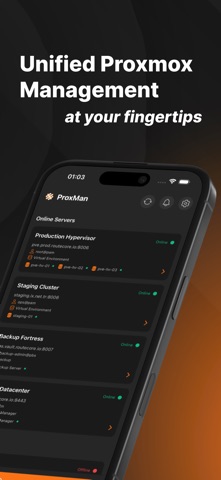
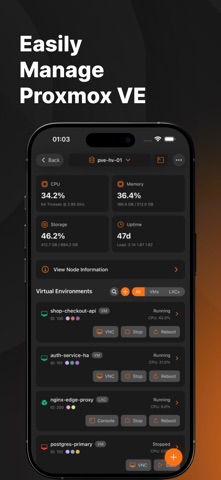
ProxMan: Lightweight Proxmox VE, Backup Server & Datacenter Manager in Your Pocket Take control of your Proxmox infrastructure from anywhere with ProxMan – the most comprehensive app for managing Proxmox Virtual Environment (PVE), Proxmox Backup Server (PBS), and Proxmox Datacenter Manager (PDM). Whether you're an IT professional, system administrator, or homelab enthusiast, ProxMan delivers the tools to monitor and manage your virtual environments on the go. Key Features: • Complete Server Monitoring Real-time statistics for CPU, RAM, disk usage, and network traffic Historical performance data with charts Temperature and hardware status monitoring Storage management and usage visualization • Virtual Machine & Container Management View, start, stop, and reboot VMs and LXC containers Modify resource allocations and configurations Create and restore snapshots/backups Create VMs and LXC containers directly from the app with full configuration options Clone existing VMs and LXC containers Pull container templates directly from OCI Registries • Backup Server Integration Full Proxmox Backup Server management Monitor backup jobs and task status Datastore management with usage metrics Navigate and manage Nested Datastore Namespaces Verify and prune backups Run garbage collection and maintenance tasks Create, edit, and manage backup jobs with scheduling and retention policies • Datacenter Manager (PDM) Manage all your Proxmox clusters and backup servers in one place Fleet-wide dashboard with health, guests, tasks, and performance charts Start, stop, and monitor VMs and containers across every server from a single screen Magic Link: jump straight from any PDM remote into its full native management screen • Terminal & VNC Access Direct terminal access to Proxmox nodes Terminal access to containers Integrated VNC console for virtual machines On-screen keyboard toolbar with Esc, Ctrl, Tab, arrows, and paste Secure connection handling • Storage Information & Content Management View detailed storage pool information Browse and manage content including ISOs, templates, and backups • Push Notifications Real-time alerts for critical events Backup job completions and failures System updates Replication job status • Multi-Node & Multi-Datacenter Manage multiple Proxmox servers seamlessly Switch between nodes with ease Drag and drop to reorder your servers Unified dashboard for all your infrastructure • Widgets Add home screen widgets to monitor your Proxmox servers at a glance View Datacenter Manager fleet health Stay updated without opening the app • Authentication & Connectivity Secure login to your PVE, PBS & PDM with OpenID Connect providers like Authentik, Keycloak, and others Passkey and Single Sign-On login through a secure system browser API Token support for seamless and secure authentication Custom HTTP Headers support for advanced routing and proxy configurations • Multi-Language Support Browse the app in English, Spanish, German, French, Turkish, and Simplified Chinese ProxMan puts the full power of Proxmox in your pocket with an elegant dark-themed interface designed specifically for mobile. No more struggling with web interfaces or complex SSH connections when you're away from your desk. Whether you need to check on server health, reboot a VM, restore a backup, or oversee your entire datacenter, ProxMan gives you all the tools you need with just a few taps. Download ProxMan today and experience professional-grade Proxmox management anywhere, anytime. Terms of Use: https://www.apple.com/legal/internet-services/itunes/dev/stdeula/ Privacy Policy: https://proxman.app/privacy Note: This app requires an existing Proxmox VE (version 7.0+), Proxmox Backup Server, and/or Proxmox Datacenter Manager installation. Proxmox® is a registered trademark of Proxmox Server Solutions GmbH. ProxMan is not affiliated with Proxmox Server Solutions GmbH.