WBuilds for Building Guide

WBuilds for Building Guide

von Sagar Khurana

  • Kategorie: Reference
  • Veröffentlicht: 2025-12-11
  • Aktuelle Version: 2.53
  • Adult Rating: 4+
  • File Size: 83.64 MB
  • Developer: Sagar Khurana
  • Compatibility: Requires iOS 15.0 or later.
Score: 4.52196
4.52196
von 797 Bewertungen

Beschreibung

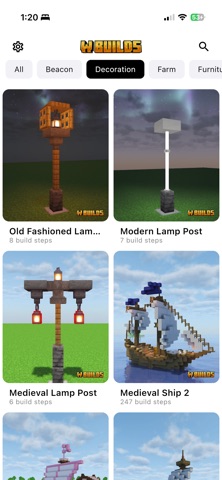
W Builds is your complete Minecraft building guide helping you create clean, accurate builds faster and easier. no matter your skill level. The Ultimate Minecraft Building Guide W Builds is built for players who want real, usable Minecraft builds not random videos. Whether you’re building a minecraft house build, survival house, a medieval tower, a castle, a farm, or a full base, W Builds walks you through every structure block by block. Perfect for Minecraft Bedrock, Minecraft Java, and Pocket Edition players. Why Players Choose W Builds • 64+ high-quality Minecraft building tutorials • Step-by-step builds for beginners and advanced players • Minecraft house build ideas from small bases to large homes • Exact material lists so you never miss a block • Chunk-style guidance — understand placement with clear layouts • Works with Minecraft Bedrock & Java Editions • Clean visuals and easy navigation Build Smarter, Faster You don’t need to be a pro builder. W Builds gives you: • Clear steps • Easy diagrams • Accurate block counts • Simple explanations Build confidently without guessing block positions. What’s Inside the App • 100+ Minecraft building tutorials • Minecraft Mod house, Medieval, houses, farms, towers, statues, decorations, beacons • Step-by-step images for every stage • Full material lists with exact quantities • Difficulty levels (Easy / Medium / Hard) • Save favorite builds • Search the entire library • Works offline • Light & dark modes • Supports Java, Bedrock, PE Minecraft House Build Ideas • Starter houses & survival bases • Modern homes, treehouses, underground bases • Medieval houses, towers, and castles • Iron farms, wheat farms, XP farms • Statues, dragons, mobs, themed builds • Fountains, paths, decorations, interiors Whether you’re upgrading your survival world or building a new base, W Builds has clean, practical tutorials ready to follow. Made for All Minecraft Players • Minecraft Bedrock Edition • Minecraft Java Edition • Minecraft PE / Pocket Edition • Works with all shaders, mods, and texture packs Better organized than YouTube. Clearer than random blueprint images. Stronger than searching “Minecraft house build” every day. Everything you need — in one clean building app. Start Building Like a Pro From cozy starter homes to massive medieval fortresses, W Builds helps you build smarter, faster, and with complete accuracy. Download W Builds now and improve your Minecraft world instantly. Join our Discord + Reddit community! Disclaimer: This app is an independent tool designed to help Minecraft players. It is not affiliated with or endorsed by Mojang AB, or Minecraft. “Minecraft” is a trademark of Mojang AB. Subscription Plans: • Yearly Pro Pass – $24.99 per year. • Monthly Pro Pass – $4.99 per month. • Weekly Pro pass – $2.99 per week (includes a 3-day free trial). • Subscriptions automatically renew unless cancelled at least 24 hours before the end of the current period. Terms & Privacy: • Privacy Policy: https://sites.google.com/view/pp-minecraftbuild/home • Terms of Use (EULA): https://www.apple.com/legal/internet-services/itunes/dev/stdeula/

Screenshots

Reviews

  • Ist eigentlich richtig geil

    3
    von Alessandro Hauser
    Die App Nice benutze sie schon sehr lange und ja natürlich braucht man premium ist selbst verständlich wenn man bisschen Geld verdienen möchte aber durch premium sind die coolen Häuser nicht verfügbar was ich sehr schade finde .
  • Kaka

    1
    von Timgioh mit Tasse
    Ich muss bezahlen und wenn ich auf eine Woche gratis klicke fährt das nicht.
  • Find ich blöd

    1
    von FC Minecraft
    Muss man wirklich Geld dafür bezahlen? Dann macht doch manche Anleitungen in ein Premium Paket und paar kostenlos aber das alles komplett Geld kostet empfehle ich nicht zu bezahlen, dann macht es lieber Freestyle und verschwendet euer Geld nicht . Nur liebe aber ich behalte mein Geld
  • Schlecht

    1
    von NoëlPav
    Nicht ohne Abo nutzbar. Bei mir erscheint keine Option um die App Gratis zu benutzen.
  • Versteckte Kosten

    1
    von Jenelfo
    Es ist nicht möglich die App kostenlos zu nutzen. Wenn man sie öffnet wird man dazu gezwungen einen Plan auszuwählen
  • Preise

    3
    von Luisi1761
    Builds sind gut, Tutorials kann man meistens sehr leicht folgen, wenn man aufhört kann man beim nächsten App öffnen wieder an dem Punkt weitermachen wo man zuletzt war. Was sich meiner Meinung nach nicht lohnt ist jedoch der Pro Preis. Für 5-10€ mehr kriegt man bei anderen lifetime access… Was ich für die gratis Version mittlerweile auch fatal finde ist wie viel Werbung dazu kommt. Vorher hat man auf einmal schon Werbung über den ganzen Bildschirm bekommen oder Ads die man nicht direkt wegklicken konnte. Wäre es dabei geblieben wäre das fine aber jetzt nach jedem 3. Build zusätzlich noch eine Werbung reinzuquetschen bringt nur Chaos auf den Anzeigeseiten… Dazu find ich’s sehr frech(!!!) dass man im Webzugang NOCHMAL für Pro zahlen soll auch wenn man das in der App schon getan hat. Darüber wird auch nirgends wirklich informiert. An sich eine gute App aber sehr fragwürdige Aktionen um Geld einzutreiben.
  • Kaum Anleitung

    3
    von 1234561234123
    Wir beißen uns bei vielen „easy“ Tutorials die Zähne aus, weil z.B. Schienen auf bestimmte Weisen verbunden werden müssen, die für uns fortgeschrittene Anfänger nicht möglich sind oder z.B. Blumentöpfe auf Schienen platziert werden sollen, was auch nicht gelingen will. Nur mal als Beispiele. Da wäre es nötig, ein paar Tipps an diesen besonderen Stellen zu geben, damit man nicht vergeblich rumexperimentieren muss um dann wieder mal frustriert aufzugeben. Zumindest für „easy“ würde sich das doch anbieten.
  • Ok but not what I need

    3
    von Curtain2020
    As a Minecraft player who played years ago and has no talent for building, I decided to try out the app to see if it would be more helpful to me than watching building videos. I like that the builds are all in one place, and that they can be filtered by difficulty and type. I built a starter house and a couple of different market stalls in a super flat creative test world to try out the app. I liked that the outlines of the builds were in black and red because it made it easy to count the blocks. I like that the needed resources are listed at the beginning of each build. I was disappointed that in each step of the instructions, only images of the resources needed for the step are depicted and not the names of those resources. During my very first build I learned not to take the material list too seriously and used similar-looking blocks interchangeably. But when it came to blocks that I am not familiar with (e.g. torchflower) or blocks that I am familiar with but forget what they are called (e.g. brewing stand), I can’t find them without the name and had to keep hitting the back button to return to the initial list of required resources at the beginning of the build in order to see what the block is called. What I really need is a floor plan for a house and examples of how the same house can look different depending on what decorative features are added. That would help me to be able to build nice looking things on my own.
  • App ist nach Bezahlung nicht Premium

    1
    von Fabi.ku
    Finger weg von der App. Ich habe das Jahresabo für 16.99€ gekauft und nach 3 Wochen war die App einfach wieder mit Werbung und nicht mehr Premium. Die Entwickler reagieren ebenfalls nicht auf E-Mails. Ganz klar keine Empfehlung!
  • Rausgeschmissenes Geld

    1
    von Dvrnfle
    Andauernd wird man zur Rezension gedrängt. Die Anleitungen haben keine Richtung das heißt du Baust die Hälfte und merkst erst dann du wolltest es um 90grad anders stehen haben. Die Auswahl ist ist ziemlich begrenzt. Bin ziemlich enttäuscht jedes gratis TikTok macht es besser!

keyboard_arrow_up