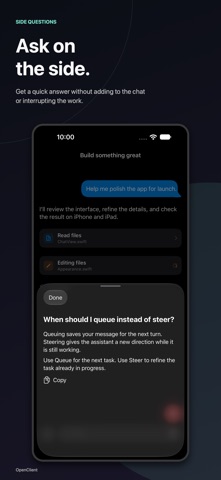
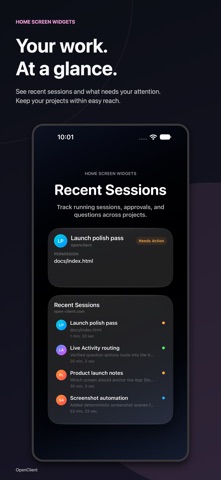
OpenClient brings your self-hosted OpenCode server to iPhone and iPad with a native interface for projects, chats, and ongoing agent work. Pick up a coding session away from your desk. Follow live responses and tool activity, review file changes, answer permissions and questions, and keep work moving from your phone or tablet. Your projects and sessions - Connect to OpenCode v1 or v2 and reconnect quickly to saved servers - Browse projects, workspaces, and conversation history - Rename v2 projects and customize their colors and images - Organize Activity as a list or board with custom workflow statuses - Mark sessions read or unread, individually or all at once; read state and session statuses sync on supported servers - Switch workspaces from chat and move sessions between workspaces on v2 A chat that works your way - Stream assistant responses with an animated 3D status indicator - Load older messages as you scroll back through a conversation - Review per-response file diffs on v2 when recorded file snapshots are available - Customize line height, tool grouping, reasoning, and context visibility - Choose the Messenger or Assistant composer on iPhone; iPad uses Assistant - Queue prompts, steer ongoing work, or ask a Side Question on v2 - Use your server’s commands, skills, agents, and models - Attach compatible files, dictate prompts, or sketch with the built-in Excalidraw board - Track session todos and respond to permission and question prompts Stay informed - Inspect recorded token usage, response timing, and model details for loaded history - Track OpenAI subscription usage and OpenRouter spending with optional provider usage setup - Show usage bars or rings in Projects and Activity, plus usage snapshot widgets - Browse project files, source-control context, and supported MCP server status Built for iOS and iPadOS - Multi-column iPad navigation for projects, sessions, and chat - Live Activities on the Lock Screen and Dynamic Island - Home Screen widgets for recent and pinned sessions - Shortcuts, control widgets, and deep links to the right session - Secure Keychain storage for saved server passwords - Widget snapshots shared without including your server password Optional notifications with OC Notify Receive Web Push alerts for completed sessions, permissions, and questions. Requires the OpenClient plugin, your own HTTPS endpoint, and the companion web app added to your Home Screen. No OpenClient-hosted notification relay is used. Free and Pro Free lets you try your own OpenCode server with up to 5 prompts per day and one session. OpenClient Pro unlocks unlimited prompts, unlimited sessions, and Project Actions, and supports continued development of this open-source app. Pro Lifetime is a one-time purchase and includes the Pro Life icon. Pro Monthly is an auto-renewing subscription billed monthly. Private and self-hosted You choose your OpenCode server. Session data stays tied to your own setup, and credentials are stored securely on device. OpenClient does not provide or proxy an OpenCode backend. Terms of Use (EULA): https://www.apple.com/legal/internet-services/itunes/dev/stdeula/